
Apparel Mockups
Put one design on four garment photos at once and download each mockup.
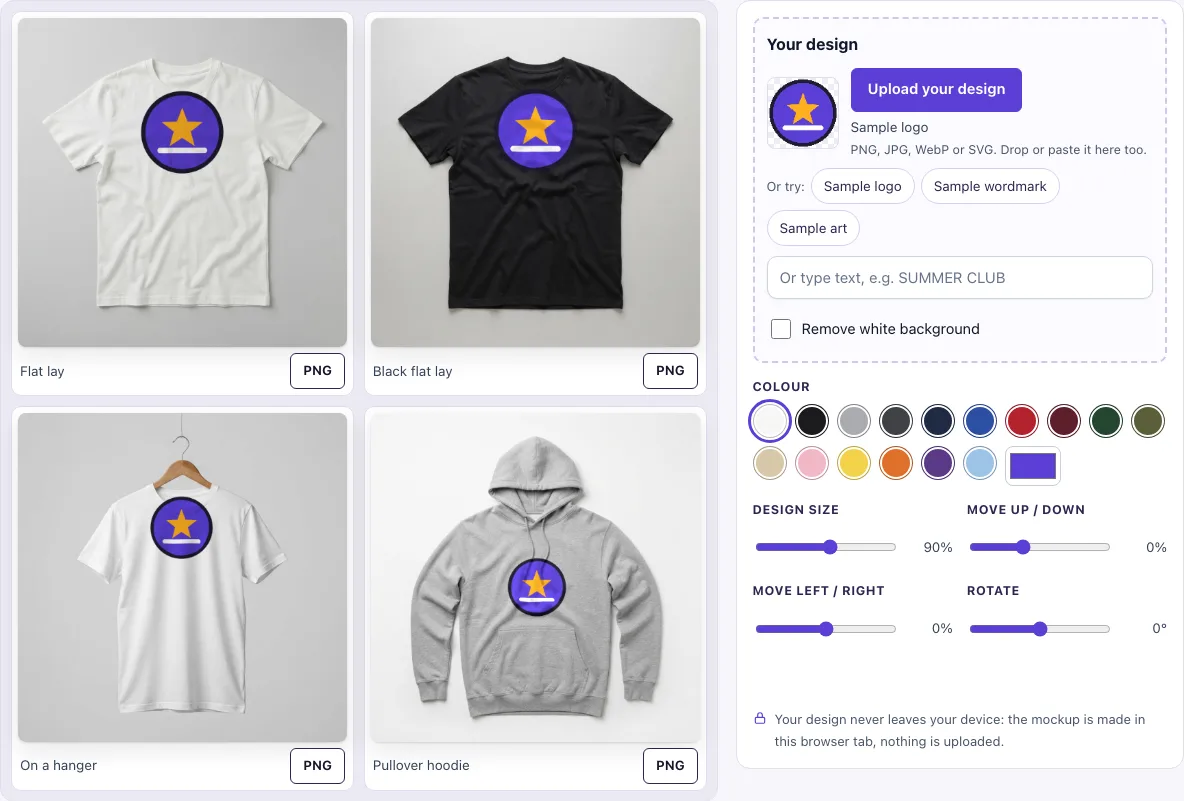
How to use the apparel mockup tool
- In the Your design box, click Upload your design, drop a file onto the box, or paste an image. To try the tool first, click Sample logo, Sample wordmark or Sample art, or type words into Or type text.
- If your upload has a plain white background, Remove white background switches on by itself; turn it off if it removes parts of your design you want to keep.
- Pick a Colour swatch or use the custom colour picker. The colour applies to the white t-shirts and the hoodie. The black t-shirt stays black.
- Set Design size (20 to 150 %, default 90 %). Then use Move up / down (−40 to 70 %), Move left / right (−40 to 40 %) and Rotate (−45° to 45°) to place the design.
- Check all four previews. The same placement is used on every garment, so your design sits in the same relative spot on each one.
- Click PNG under any garment to save that garment at 1024 × 1024 px.
For the cleanest print, use a PNG with a transparent background. On a light shirt, avoid relying on white areas, because white ink on white fabric is invisible. On a dark shirt, use light colours.
All four previews update together each time you change the design, the colour or a slider, so you can check the whole set before saving anything.
What is an apparel mockup
An apparel mockup is a realistic picture of a garment with a design printed on it, made before any clothing is produced. It lets a seller show how a logo, print or slogan will look on a t-shirt or hoodie without paying for samples first.
Most mockups begin with a photo of a plain garment, called a blank base. The design is placed on top so that it follows the shape and folds of the fabric. Buyers see the finished item rather than a flat file, which helps them judge size, colour and style.
How to make clothing mockups for a store
Start with a blank garment photo, place your design where it would be printed, and export one image per product. Keep the placement identical across every shirt in a range so the collection looks consistent.
The tool measures placement inside each garment’s own print area, so a logo sits in the same relative position on all of them. Recolouring keeps the photo’s folds and shadows, so one photo can serve many colours.
The print looks believable because the design is never redrawn. It is only moved by at most about 3 px along the large folds of the photo and shaded by the fabric. On white fabric, the ink is multiplied with the fabric so the folds show through. On coloured or dark fabric, the design is printed as an opaque layer, lightly shaded by the folds and fabric texture, much like ink on a white underbase.
Where do the garment photos come from
The four garment photos were generated with Google’s Gemini image models in October 2026 and checked by hand: they show no people, no logos and no text. They are used only as blank bases, and your design is placed on them by code in your browser, so the same settings always give the same result.
Blank mockups for clothing: which garment?
Pick the blank that matches the product you are selling, then add your design. For a light tee use the white shirt mockup; for a dark one use the black shirt mockup. For a hooded sweatshirt use the hoodie mockup or the black hoodie mockup. If you only need the shape of a tee to sketch on, the t-shirt outline is a plain line drawing.
Frequently asked questions
Are these clothing mockups free?
Yes. You can make and download them without an account, and the PNG and JPG files cost nothing.
Is my design uploaded?
No. Your file stays in your browser tab, so nothing is sent to a server. Only the page link’s settings are shared, not your artwork.
Can I use them commercially?
Yes, for showing and selling your own designs and products. Use them in listings, ads, posts and portfolios. Do not resell the blank photos as templates.
What size are the downloaded images?
Each garment is saved as a PNG at the photo’s full size, 1024 × 1024 px.
Can I download all four garments in one file?
Not yet. Each garment is saved separately with its own PNG button.
Which garments are included?
Four photos: a white t-shirt flat lay, a black t-shirt flat lay, a white t-shirt on a wooden hanger and a heather-grey pullover hoodie. The colour you pick recolours the three light garments together, so you can show a whole colourway in one go.
Can I make the black t-shirt another colour?
Not on this page: the black t-shirt is a real black garment photo and stays black, which keeps its shading natural. To show your design on other dark colours, pick Navy, Charcoal or Black for the light garments, or use the t-shirt mockup.
Related tools
- T-shirt mockup — Use this for a general t-shirt preview of your design.
- Hoodie mockup — Use this when your product is a hoodie or sweatshirt.
- Black shirt mockup — Use this to check how a design looks on dark fabric.
- White shirt mockup — Use this to focus on light-coloured tees.
- Black hoodie mockup — Use this for a dark hoodie that needs light-coloured artwork.
- Blank hoodie template — Use this when you need a hoodie photo in any colour to design on.
- T-shirt template — Use this when you need a blank shirt layout to design on.
- Hang tag mockup — Use this to show a label or tag that goes with your clothing.