
Black Hoodie Mockup
Place your design on a black pullover hoodie and download the mockup.
A black hoodie mockup shows your design printed on a black hoodie, so you can check how it looks before you order or post it. This tool uses an AI-generated photo of a plain black pullover hoodie, so there is no colour to set. It runs in your browser tab, is free, and has no sign-up.
You add your own design, then move, resize and rotate it on the chest. When you are happy with it, download the result as a PNG or JPG. If you searched for a black hoodie mock up, this is the same tool: the hoodie is already black, so you can start with your artwork straight away.
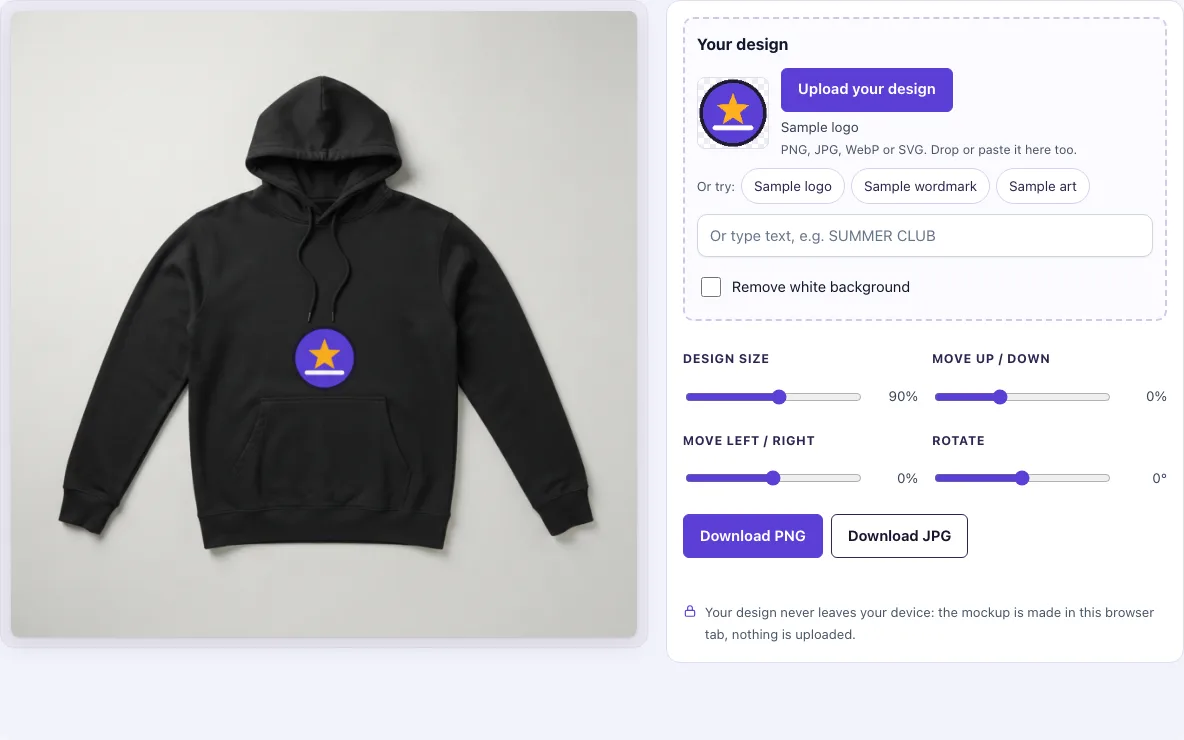
How to use the black hoodie mockup
- Look at the hoodie. It is a photo of a black pullover hoodie (front view, hood and kangaroo pocket); this page has no colour control.
- Add your design. Click ‘Upload your design’ and pick a PNG, JPG, WebP, GIF or SVG file. You can also drop a file on the box or paste an image. To try the tool first, click ‘Sample logo’, ‘Sample wordmark’ or ‘Sample art’.
- Or type text. Enter words in the ‘Or type text’ box and they turn into a design. On this page the text is light by default.
- Check the background. If your picture has a plain white background and no transparency, the ‘Remove white background’ switch turns on by itself and makes near-white pixels transparent.
- Set the size. Use ‘Design size’ (20–150 %, default 90 %). At 100 % the design fits the print area.
- Place the design. Use ‘Move up / down’ (−40 to 70 %), ‘Move left / right’ (−40 to 40 %) and ‘Rotate’ (−45° to 45°) until the design sits where you want it on the chest.
- Download. Click ‘Download PNG’ or ‘Download JPG’. The file is saved at 1024 × 1024 px.
Your settings stay in the page address, so a copied link reopens the same placement. The design file is not in the link, so the person who opens it will need to upload their own file. For the cleanest print, use a PNG with a transparent background.
How to make a black hoodie mockup
To make a black hoodie mockup, place your artwork on a photo of a black hoodie and adjust its size and position until it looks right. This tool does that in your browser: the hoodie photo is a blank base, and your design is placed on it by code.
The design is never redrawn. It is moved by at most about 3 px along the big folds of the photo and shaded by the fabric, so it follows the cloth without changing your artwork. The default print area is the chest between the drawstring ends and the pocket, so a wide, short design fits best; a taller design is scaled down to fit.
What designs look good on a black hoodie
Light designs look best on a black hoodie. On black fabric the print is drawn as an opaque ink layer, like ink on a white underbase, so light colours read clearly while dark colours sink into the fabric.
White areas in a design print as solid white on a black hoodie, so a logo that sits on a white box shows that box; switch on Remove white background for such files. A PNG with a transparent background gives the cleanest print.
How is the black hoodie made?
The hoodie is a photo of a plain black pullover hoodie, generated with an AI image model and picked by hand; it has no logo, text or person in it. The tool cuts the hoodie out of the background with a mask, and it measures the light and shade of the fabric so that the folds, the ribbed cuffs and the pocket seam stay visible under your design.
On black fabric your design is drawn as an opaque layer, so a white logo stays white and bright colours stay saturated, while the fabric adds a light texture and a few per cent of shading from the folds. The drawstrings are not copied back on top, so keep the design below them.
Frequently asked questions
Is it free?
Yes. Everything on this page is free, and there is no sign-up and no paid option.
Is my design uploaded?
No. The mockup is made in your browser tab, and your design file is never uploaded. Only the settings you choose are kept in the page address. Because your artwork stays on your own device, you can test private designs before you publish them.
Can I use it commercially?
Yes, for your own designs and products. You may use the downloaded images to show and sell your designs in shop listings, ads, social posts and portfolios, with no credit needed. The blank hoodie photos themselves may not be resold as mockup templates.
Why does the print sit behind the drawstrings?
The drawstrings stay in front of the design when you move it up, so the top of a print can look partly hidden. Move the design down with ‘Move up / down’ to keep it clear of the strings.
What size should I download?
Downloads are 1024 × 1024 px, PNG or JPG.
Why does my design look faint on the black hoodie?
Dark ink has little contrast against black fabric, so light colours work better. The typed-text box makes light text by default, so change dark parts of your design to light colours if they fade.
Does my shared link include my design?
No. The link keeps the placement, but not the design file. Anyone who opens it will need to upload their own artwork.
Related tools
- Hoodie mockup: use it to try your design on a hoodie without starting from black.
- Black shirt mockup: use it when your design is for a black t-shirt rather than a hoodie.
- Hoodie template: use it when you want a hoodie base to design on.
- Apparel mockups: use it to put one design on four garment photos at once.
- T-shirt mockup: use it to place the same design on a t-shirt.
- Black shirt template: use it when you need a black shirt base for a design.