
Book Mockup
Put your cover on a paperback or hardcover book and download a mockup image.
Free · runs in your browser · nothing is uploaded
A book mockup is a picture of a book with your own cover on the front. This free tool draws one in your browser. Upload your cover, choose a book shape and layout, and download a PNG or JPG image. There is no sign-up, and your cover is never uploaded.
The book is shown in a three-quarter view, with the cover facing you and the page block visible on the right-hand side and along the top. Use the result to show a new book in a shop listing, an ad, a social post or a portfolio before the printed copies exist.
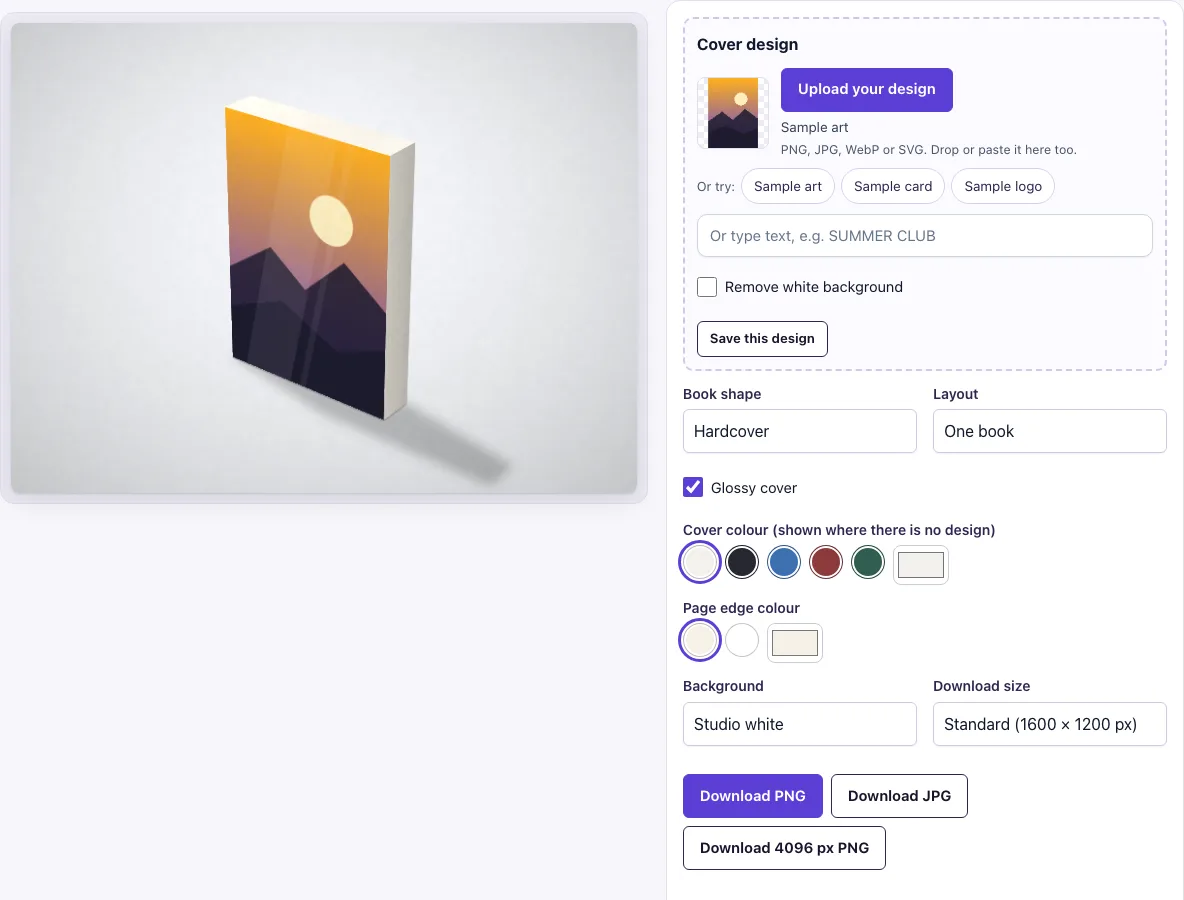
How to use the Book Mockup
- Check the Cover design slot. A sample design is loaded at the start, so you can see a preview straight away. To use your own cover, click Upload your design, drop a file onto the page, or paste an image. You can also use the sample buttons or type text in the text box.
- If your cover has a white background you want removed, switch on Remove white background. Near-white pixels become transparent.
- Under Book shape, choose Paperback, Hardcover (the default), Thick hardcover or Square photo book.
- Under Layout, choose One book (the default), Two books or Three books. All books carry the same cover.
- Leave Glossy cover on, or switch it off for a matte cover.
- Under Cover colour, pick white, black, blue, red or green. The colour only shows where there is no design.
- Under Page edge colour, choose cream or white.
- Under Background, pick one of the scenes (Studio white is the default).
- Under Download size, choose Standard (1600 × 1200 px) or Large (2400 × 1800 px), then click Download PNG or Download JPG.
All your settings are kept in the page address. Copy the link to reopen the same view later or to share it.
What size should the book cover be
Make the cover match the front of the book shape you chose. The shapes are drawn as proportions (width : height : thickness) and the tool does not claim a real trim size.
| Book shape | Width : height : thickness | Cover ratio to design for |
|---|---|---|
| Paperback | 140 : 210 : 20 | 2 : 3, for example 1200 × 1800 px |
| Hardcover | 150 : 215 : 30 | about 7 : 10, for example 1400 × 2000 px |
| Thick hardcover | 150 : 215 : 46 | about 7 : 10, for example 1400 × 2000 px |
| Square photo book | 190 : 190 : 24 | 1 : 1, for example 1600 × 1600 px |
The tool fills the front face with a cover fit. A design with the wrong proportions is cropped, not stretched, so keep the title and other key text away from the edges. A 6 × 9 inch book has exactly the 2 : 3 ratio of the paperback shape.
What does the book mockup show on the sides
The right-hand face is the page block and the top is the top edge of the pages, both in the page edge colour you pick, with fine lines on the side to suggest pages. You cannot upload artwork for the spine or the back cover, because the book is drawn from the front. If you need a spine design shown, make a separate picture of it.
How to make a book mockup
The book is drawn in the browser, not photographed. The book, its soft shadow and the background are all built with code, and the light falls from the top left, so the top is the lightest part and the page side is the darkest.
Your cover is placed on the front face. With two or three books you see the same cover repeated, which suits showing a series or a stack. Because the scene is drawn by code, the book always looks clean and evenly lit, which keeps the cover easy to read in listings and ads.
Can I turn off the glossy look
Yes. The Glossy cover switch is on by default and adds soft white highlight bands across the cover. Switch it off for a matte cover. The edge highlights and the shadow stay in place either way.
Frequently asked questions
Is this book mockup free?
Yes. There is no paid option on this page, and no sign-up is needed.
Can I use the mockup commercially?
Yes. You can use the images you download here to show and sell your own designs and products — in shop listings, ads, social posts and portfolios — with no credit required. You may not resell the blank scenes themselves as mockup templates or use them to run a similar service; see the terms.
Does my cover get uploaded anywhere?
No. The tool runs in your browser, and the design file is never uploaded. You do not need to create an account.
Is the scene a photo?
No. The book, its shadow and the background are drawn by code in your browser, so there is no stock photo involved and the same settings always give the same picture.
Can I make more than one book in one image?
Yes. Under Layout, pick Two books or Three books. Every book carries the same cover.
Can I show the back cover or the spine?
No. The book is drawn from the front, so only the front cover takes your design.
What file formats can I download?
You can download the mockup as a PNG or a JPG, at Standard (1600 × 1200 px) or Large (2400 × 1800 px).
Related tools
- Brochure Mockup — Upload your brochure design, choose the folds, size and view, and download a realistic mockup image
- Magazine Mockup — Upload your cover or spread, choose the size and view, and download a realistic magazine image
- Business Card Mockup — Upload your card design, choose the size, paper and surface, and download a realistic mockup image
- Envelope Mockup — Upload your logo or print, pick the envelope size and view, and download a realistic envelope mockup image
- Flyer Mockup — Upload your flyer, choose the layout and size, and download a realistic mockup image
- Greeting Card Mockup — Upload your cover and optional inside spread, choose the scene, and download a realistic folded card mockup
- Letterhead Mockup — Upload your letterhead, choose the layout and sheet size, and download a realistic stationery image
- Menu Mockup — Upload your menu design, choose a single card or bi-fold, and download a realistic mockup image