
Business Card Mockup
Upload your card design, choose the size, paper and surface, and download a realistic mockup image.
This business card mockup tool places your card design onto cards lying on a surface, then gives you a PNG or JPG image to show your work. It runs in your browser, is free to use, and needs no sign-up. You upload a front design and, if you want, a back design, then choose a layout, card size, paper colour and background.
Your design file is never uploaded, so your artwork stays on your device. You can use the image in shop listings, ads, social posts or a portfolio. A business card mockup lets clients see a realistic version of your design before anything is printed.
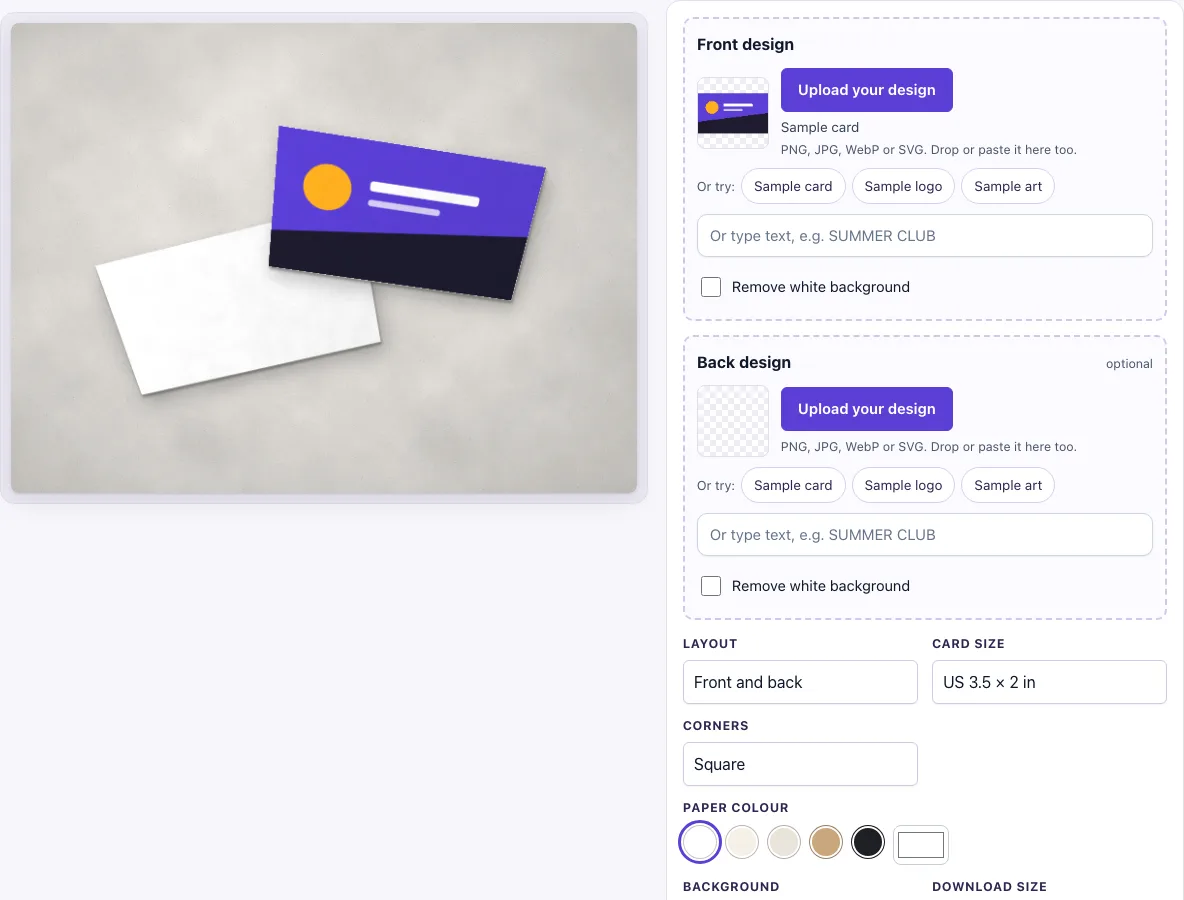
How to use the Business card mockup
- In the Front design box, click Upload your design, drop a file onto the box, or paste an image. This slot is required. You can also type text in the text box, or click Sample card, Sample logo or Sample art to try the tool first.
- Optional: add a Back design in the same way.
- Turn on Remove white background if your design sits on a white box. The switch turns on by itself when an uploaded image has a plain white background and no transparency.
- Under Layout, choose Front and back, Single card or Stack of cards.
- Under Card size, choose US 3.5 × 2 in or Europe 85 × 55 mm.
- Under Corners, choose Square or Rounded.
- Under Paper colour, pick white, cream, natural, kraft or black, or use the colour picker for a custom colour.
- Under Background, pick one of the eight scenes.
- Under Download size, choose Standard (1600 × 1200 px) or Large (2400 × 1800 px).
- Click Download PNG or Download JPG.
The settings are kept in the page address, so copy the link if you want to reopen the same layout later. For print work, upload your artwork without bleed or crop marks, because the mockup shows the trimmed card.
How to make a business card mockup
A business card mockup is a realistic picture of your card design, made by placing your artwork onto a card shape in a scene. The tool fills the whole card face with your design, so the card looks printed even though it is only an image.
The design fills the card face using a “cover” fit. If your design’s proportions differ from the card’s, the tool crops the edges rather than stretching the image. Plan your artwork at the card’s ratio so that nothing important is cut off. Text and logos should sit well inside the edges.
Transparency works differently. Any part of the design that is transparent shows the paper colour underneath. This is useful if you want a logo to look printed directly on a kraft or black card. The scene then adds card thickness, soft shadows, light from the top left and a fine paper grain. These effects are added around your design and do not change its pixels.
What size is a business card
In the US and Canada, a business card is 3.5 × 2 in (88.9 × 50.8 mm). Most of Europe uses 85 × 55 mm, and the credit-card size (ISO/IEC 7810 ID-1) is 85.60 × 53.98 mm.
The two common sizes have different proportions. A 3.5 × 2 in card has a 7:4 ratio, so a design of 1050 × 600 px (300 dpi) or 2100 × 1200 px fits exactly. An 85 × 55 mm card has a ratio of about 17:11, so a design of 1020 × 660 px fits that size. If you use a 7:4 design on the European size, the sides will be cropped.
How should I prepare the artwork?
Export the card face exactly as it will be cut: no bleed, no crop marks and no guides, because the mockup shows the trimmed card. A PNG keeps sharp text and allows transparent areas; a JPG works too, and the Remove white background switch can take out a plain white box around a logo. Keep text and logos about 1/8 in (3 mm) inside the edge, the same safe margin a printer asks for.
Frequently asked questions
Is this business card mockup free?
Yes. You can use it without signing up. There is no paid option.
Can I use the mockup commercially?
Yes. You can use the images to show and sell your own designs in shop listings, ads, social posts and portfolios, with no credit required. You may not resell the blank scenes as mockup templates.
Is my design uploaded?
No. The tool runs in your browser, and the design file is never uploaded.
What file should I upload for a business card mockup?
Upload a PNG, JPG, WebP, GIF or SVG file at the card’s ratio, without bleed or crop marks. Use a PNG with transparent areas if you want the paper colour to show through.
Is the scene a photo?
No. The card, its shadow and the background are drawn by code in your browser, so there is no stock photo involved and the same settings always give the same picture.
Do I need a back design?
No. The back design is optional. If you leave it empty, the back of the card shows the paper colour you chose.
Do I need to install anything or create an account?
No. The tool runs in your browser tab, so there is nothing to install and no account to create. Open the page, add your design and download the result.
Related tools
- Postcard mockup: use it to show a larger mailing or promotional card.
- Letterhead mockup: use it to present your stationery alongside your business cards.
- Envelope mockup: use it to show a matching envelope for your branded stationery.
- Flyer mockup: use it to display a printed flyer or handout.
- Sticker mockup: use it to show a logo or design on a sticker.
- Hang tag mockup: use it to show a branded tag on a product.
- Lanyard and ID badge mockup: use it to show a card on a lanyard or badge.
- Poster mockup: use it to present a larger print design.