
Letterhead Mockup
Upload your letterhead, choose the layout and sheet size, and download a realistic stationery image.
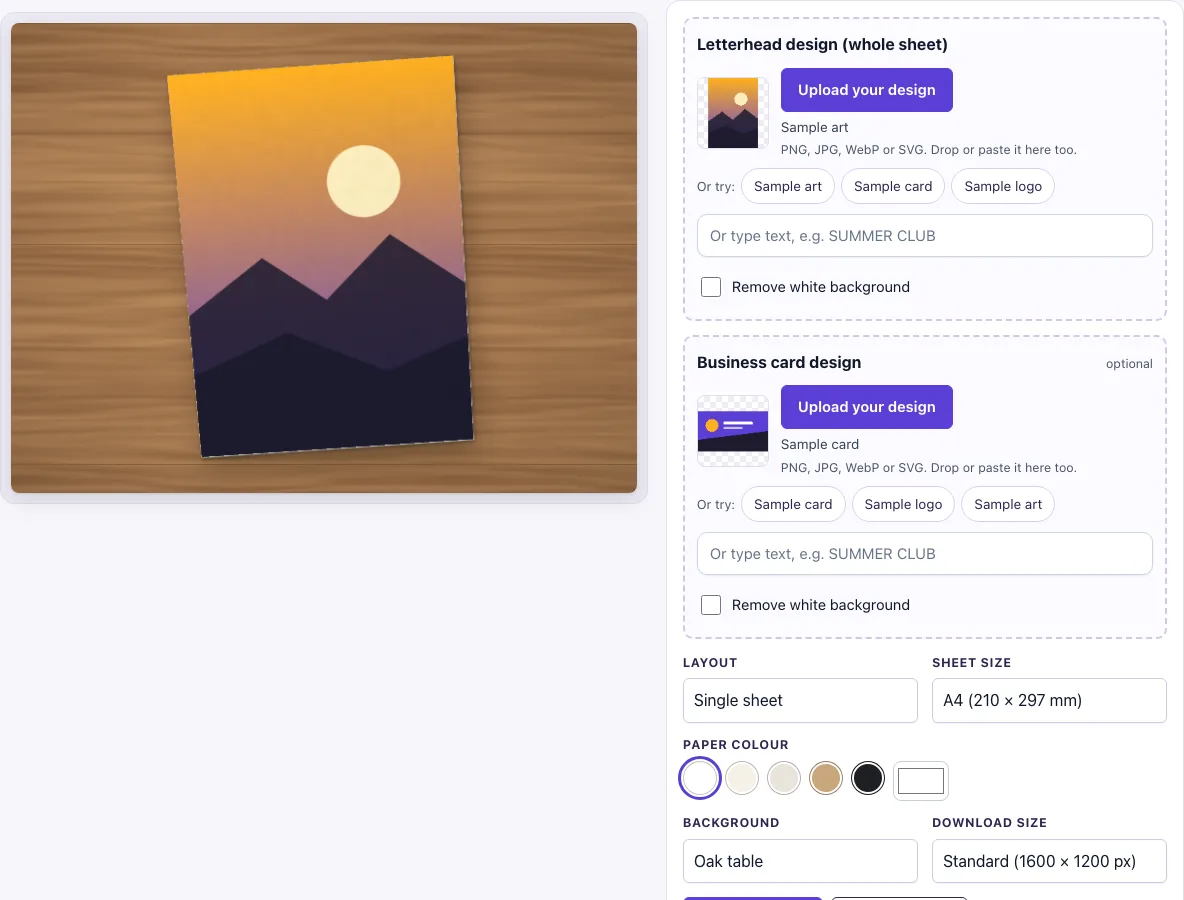
How to use the Letterhead mockup
- Under Layout, choose Single sheet, Sheet, envelope and business card, or Pile of sheets.
- Under Sheet size, choose A4 (210 × 297 mm) or US Letter (8.5 × 11 in).
- Under Paper colour, choose white, cream, natural, kraft or black.
- In the Letterhead design (whole sheet) slot, click Upload your design, drop a file on the box, or paste an image. You can also type text instead, or use Sample art to try the tool first.
- If you have one, add a Business card design in its slot. This step is optional.
- Check the Remove white background switch. It turns on automatically when your image has a plain white background and no transparency.
- Under Background, pick one of the eight options. The default is Oak table.
- Under Download size, choose Standard (1600 × 1200 px) or Large (2400 × 1800 px).
- Click Download PNG or Download JPG.
Your settings are kept in the page address. If you copy the link, it reopens the same picture. The same settings always give the same result.
Tip: upload the whole page as one image, with the header, footer and empty writing area, because the sheet design covers the full page. Use Sheet, envelope and business card to present a stationery set; the envelope is plain paper, and the card shows your Business card design if you add one. Try cream or natural Paper colour to preview your letterhead on different stock.
What size is a letterhead?
The tool offers two sheet sizes: A4 (210 × 297 mm) and US Letter (8.5 × 11 in). Pick the size that matches the paper your printer or template uses. A4 is the usual choice outside North America, and US Letter is the standard in the United States.
How to make a letterhead mockup
Create your design as the whole sheet, not as a small logo. The sheet design covers the full page, so include the header, the footer and the blank writing area in the same file. The mockup then shows your letterhead exactly as a reader would see it on paper.
What file should I upload for a letterhead mockup?
Upload an image at the same ratio as the sheet. For A4, use 2480 × 3508 px at 300 dpi. For US Letter, use 2550 × 3300 px. The tool accepts PNG, JPG, WebP, GIF and SVG files. A PNG with a transparent background gives the cleanest result, and a plain white background works too because of the Remove white background switch.
Can I add an envelope and business card?
Yes. Choose Sheet, envelope and business card under Layout. The envelope is plain paper in DL size (110 × 220 mm, ISO 269), so it does not carry your artwork. The business card is 85 × 55 mm and shows your business card design, or the paper colour if you have not uploaded one. In a pile of sheets, only the top sheet shows your design.
What should a letterhead design include?
A letterhead is the printed top, side or bottom of a sheet that holds your logo, name and contact details, with a blank area left for the letter. In this tool the file you upload is the whole sheet, so draw the header and footer in place and leave the middle white or empty. The picture then shows how the writing space looks next to your branding.
Keep important details such as the logo and address a little way inside the edges. The design fills the sheet using a cover fit, so a file with a different ratio from the chosen sheet is cropped at the edges. If you pick a coloured or kraft paper, any transparent area of your PNG shows that paper colour, which is a quick way to preview a design on different stock.
Which layout should I choose?
Use Single sheet when you want the largest view of your letterhead. Use Sheet, envelope and business card to show a branded stationery set on one table. Use Pile of sheets for a more casual picture of paper stacked on a desk, where only the top sheet carries your design and the sheets below show the plain paper colour.
Frequently asked questions
Is this letterhead mockup free?
Yes. There is no sign-up and no paid option.
Can I use the mockup commercially?
Yes. You can use the images you download here to show and sell your own designs and products — in shop listings, ads, social posts and portfolios — with no credit required. You may not resell the blank scenes themselves as mockup templates or use them to run a similar service; see the terms.
Is my design uploaded to a server?
No. The tool runs in your browser. Your design file is never uploaded, and nothing is sent to a server.
Will I get the same picture again later?
Yes. Copy the page link to reopen the same picture, because the settings are stored in the address. The same settings always produce the same image.
Is the scene a photo?
No. The letterhead sheet, its shadow and the background are drawn by code in your browser, so there is no stock photo involved and the same settings always give the same picture.
Does the envelope show my logo?
No. The envelope is plain paper in the colour you chose, drawn with its closed flap. Only the sheet and, if you upload one, the business card show designs.
Related tools
- Business card mockup: use it when your main item is a card and you want to show it alone.
- Envelope mockup: use it when you want to show the envelope on its own.
- Flyer mockup: use it for single-page promotional sheets.
- Brochure mockup: use it for folded, multi-page printed pieces.
- Postcard mockup: use it for mailed cards with a message side.
- Greeting card mockup: use it for folded cards and printed greetings.
- Menu mockup: use it for restaurant and café menus.
- Poster mockup: use it for large wall prints.
- Newspaper ad mockup: use it to show an advert on a newspaper page.