
Newspaper Ad Mockup
Upload your ad, choose its slot on the page, and download a realistic newspaper mockup image.
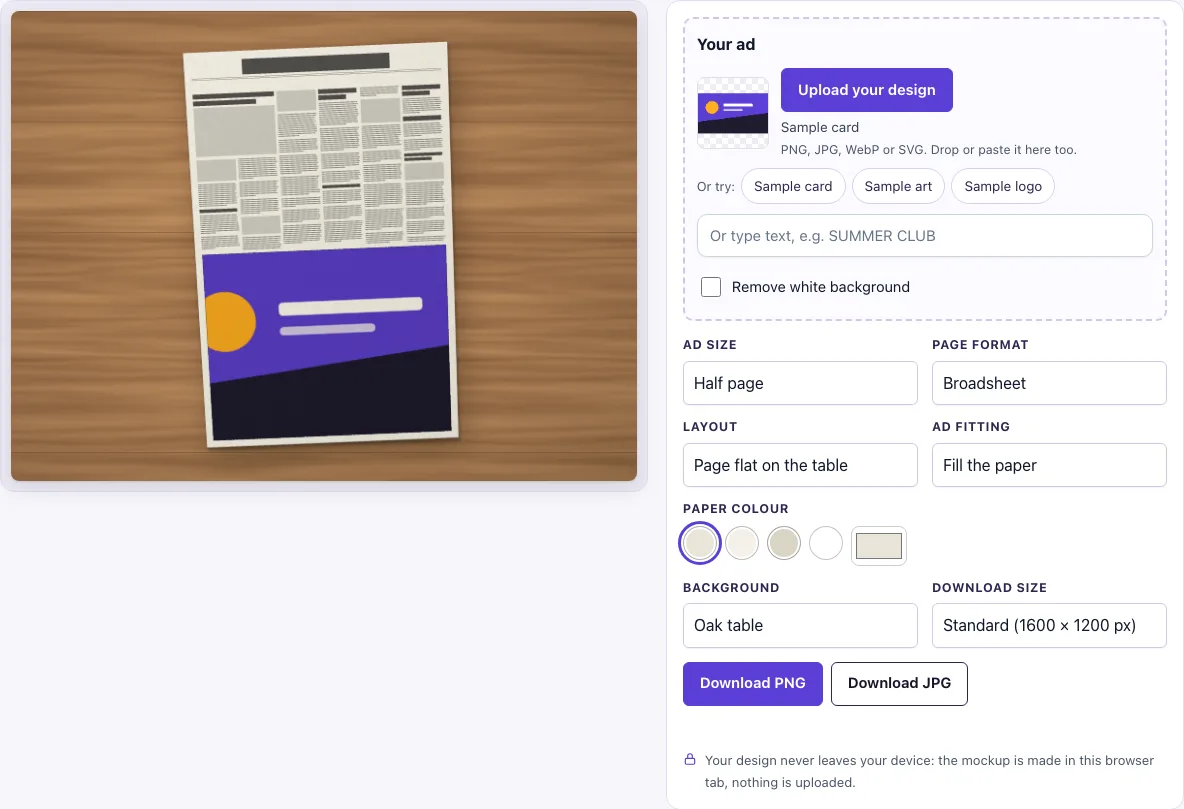
How to use the newspaper ad mockup tool
- Add your ad to the ‘Your ad’ slot. Click ‘Upload your design’, drop a file on the box, or paste an image. You can also click ‘Sample card’, ‘Sample logo’ or ‘Sample art’, or type text into the text box.
- Check the ‘Remove white background’ switch. It turns on automatically when your image has a plain white background and no transparency. Switch it off if you do not want that.
- Choose ‘Ad size’: Half page (the default), Quarter page, Small box ad or Full page.
- Choose ‘Page format’: Broadsheet or Tabloid.
- Choose ‘Layout’: Page flat on the table, Folded in half, with a second paper, or Two newspapers.
- Choose ‘Ad fitting’: Fill the paper or Whole design.
- Choose a ‘Paper colour’ (Newsprint, Bright newsprint, Recycled grey or White) and a ‘Background’.
- Pick a ‘Download size’, then click ‘Download PNG’ or ‘Download JPG’.
The settings are kept in the page address. If you copy the link, it reopens the same picture with the same settings.
Tip: choose the Ad size first, because it sets the shape of the slot. Use Whole design if you are not sure of your ad’s ratio, then switch to Fill the paper once the artwork matches the slot. Folded in half, with a second paper adds a crease and a second newspaper for a more natural picture.
What size is a newspaper ad?
A newspaper ad does not have one fixed size. It depends on the page and the slot you choose. In this tool, a half page ad is the full-width lower half of the page, a quarter page ad is half the width and half the height, and a full page ad replaces the whole page and leaves no text. A tabloid page is 430 × 280 mm (17 × 11 in), according to Wikipedia’s Newspaper format article. Real broadsheet sizes vary by publisher, so check the paper you are targeting.
Design your ad at the slot’s shape. A half page is roughly 1.2:1 landscape on a broadsheet, and a quarter page is about 0.6:1 portrait. To check the fit, try the ‘Whole design’ fitting first.
Is the newspaper page real text?
No. The page uses greeked text, which means grey bars stand in for headlines, photos and columns. There are no real words, so your ad is the only readable content on the page. The ad is printed onto the paper with a multiply effect. White parts of the ad take on the colour of the newsprint, and the ad sits inside a thin black rule.
How to make a newspaper ad mockup look like print?
Shadows, paper grain and light falling from the top left are added by the scene. Your design pixels are not changed, so the ad keeps its own colours and detail. The same settings always produce the same picture, which makes it easy to compare versions. If you want the ad to look printed, pick a paper colour that suits your design and use ‘Whole design’ so the ad keeps its full shape, with a paper margin around it.
What file should I upload for a newspaper ad mockup?
The design slot accepts PNG, JPG, WebP, GIF and SVG files. A PNG is a good choice if you want to keep transparent edges, because transparent areas let the newsprint show through naturally. If you upload a JPG or other image with a plain white background, the ‘Remove white background’ switch handles it for you. Use a file that matches the slot’s ratio, as described above, so the ad fills the space well.
Frequently asked questions
Can I use the mockup commercially?
Yes. You can use the images you download here to show and sell your own designs and products — in shop listings, ads, social posts and portfolios — with no credit required. You may not resell the blank scenes themselves as mockup templates or use them to run a similar service; see the terms.
Is this newspaper ad mockup free?
Yes. There is no sign-up and no paid option.
Does the tool upload my design?
No. The tool runs in your browser, so your design file is never uploaded and nothing is sent to a server.
Will I get the same picture if I come back later?
Yes. The same settings always give the same picture. Because the settings are stored in the page address, a copied link reopens the picture exactly as you left it.
Can I change the scene’s lighting or shadows?
No. Shadows, paper grain and the top-left light are added automatically by the scene. You can change the ‘Background’, ‘Paper colour’ and layout, but the lighting stays the same.
Is the scene a photo?
No. The newspaper page, its shadow and the background are drawn by code in your browser, so there is no stock photo involved and the same settings always give the same picture.
Can I make the ad bigger or smaller on the page?
Yes. Change Ad size to Half page, Quarter page, Small box ad or Full page. The ad always sits at the bottom right of the page, and the greeked text around it adjusts to leave the space free.
Related tools
- Magazine mockup: use it when your design is a glossy cover or inside spread rather than a newspaper ad.
- Flyer mockup: use it to show a single-sheet handout or promotion.
- Brochure mockup: use it to present a folded or multi-page printed piece.
- Poster mockup: use it to show a large wall print or event poster.
- Postcard mockup: use it to display a small mailed card design.
- Hang tag mockup: use it to show a branded tag on a product.
- Menu mockup: use it to present a restaurant or café menu.
- Greeting card mockup: use it for folded cards and printed greetings.