
Paper Bag Mockup
Put your logo on a paper shopping bag, choose the size, handles and paper colour, and download a mockup image.
This paper bag mockup tool places your logo or design on the front of a paper shopping bag and gives you a PNG or JPG image to share. It runs in your browser, is free, and needs no sign-up. The bag has a side gusset, an open top and handles, so you can show a finished bag mockup without printing a sample.
Start with the sample logo that is already loaded, or upload your own design. Then adjust the bag size, handles, paper colour and background until the picture looks right. Your design file is never uploaded. Use the result for a shop listing, an ad or a social post.
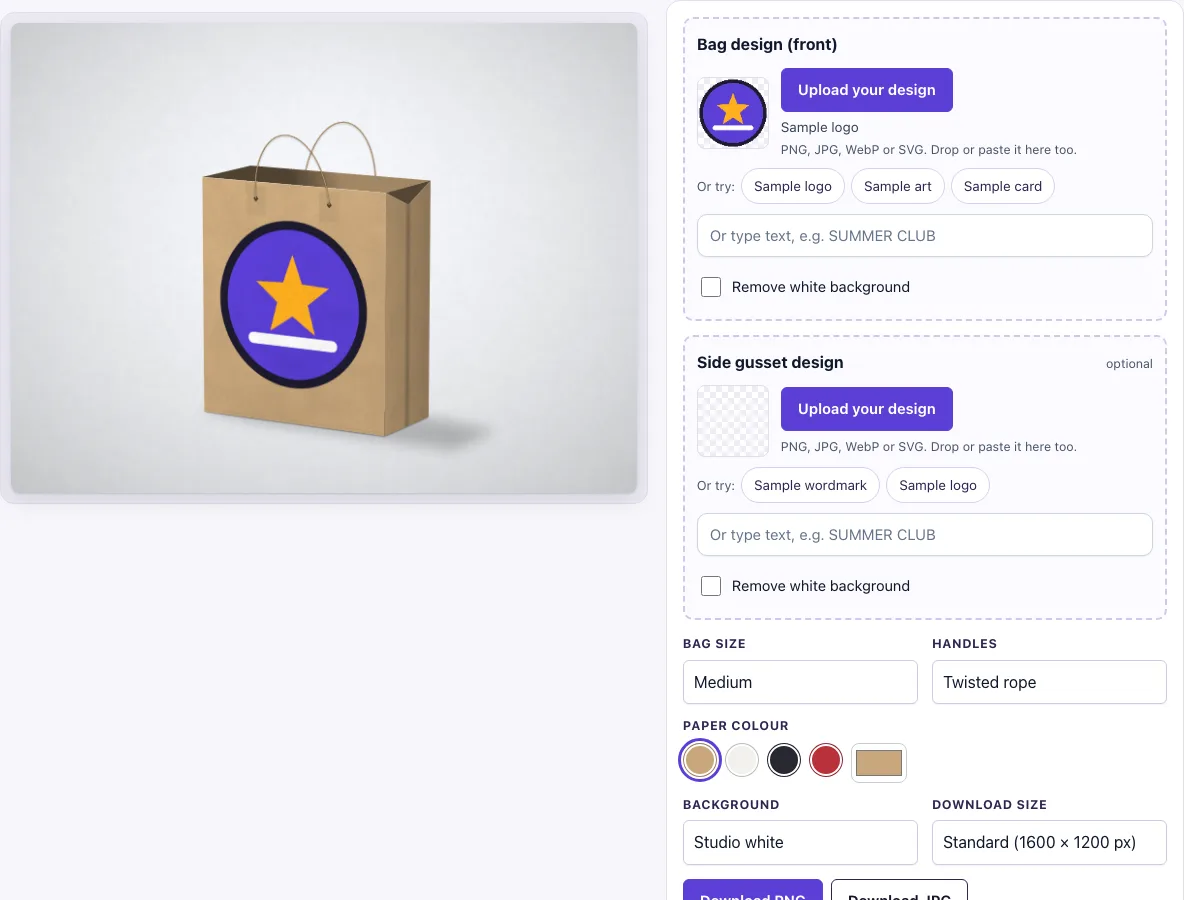
How to use the Paper bag mockup
- Check the Bag design (front) upload. A sample logo is loaded, so you see a result straight away. To use your own design, click Upload your design, drop a file on the box or paste an image. You can also type text in the text box instead.
- Accepted formats are PNG, JPG, WebP, GIF and SVG. If your logo has a white background, switch on Remove white background to make near-white pixels transparent.
- Optional: add a Side gusset design using the same upload, sample or text options.
- Choose a Bag size: Small, Medium (default) or Large.
- Choose Handles: Twisted rope (default), Flat paper or No handles.
- Choose a Paper colour: kraft (default), white, black or red, or pick a custom colour with the colour picker.
- Choose a Background, such as Studio white (the default), Oak table or Sage.
- Choose a Download size, Standard (1600 × 1200 px) or Large (2400 × 1800 px), then click Download PNG or Download JPG.
The settings are kept in the page address. Copy the link to reopen the same view later or to send it to someone else. Pick the Large download size when the image will be shown at a big size.
How to make a paper bag mockup
A paper bag mockup is a picture of your design on a bag, made without printing a real bag. This tool draws a paper shopping bag with a side gusset, an open top and handles, then fits your design to the front panel. The front design is scaled to fit with no cropping, leaving a margin of about 8% at the sides and 10% at the top and bottom.
Can I put a design on the side of the bag?
Yes. The Side gusset design slot is optional and is fitted inside the middle of the side panel. The gusset is drawn slightly darker than the front, with a centre fold line and a V dip at the open top, so your side design sits within those lines.
What colours can the paper bag be?
The bag can be kraft (the default), white, black or red. For any other shade, use the colour picker under Paper colour. The chosen colour shows around your design and under any transparent parts of it, so a transparent logo takes on the paper shade.
Can I choose rope or flat handles?
Yes. Under Handles, choose Twisted rope, Flat paper or No handles. Rope handles show twist marks, and all handle types are attached with reinforcement patches and small holes, so they look like real bag handles.
How is the bag drawn
The bag is drawn from three parts: the front panel carries your design, the side gusset is shaded darker with its fold line, and the open top shows the inside of the back wall. The handles are added last, with small reinforcement patches where they enter the bag. Light falls from the top left, which is why the front panel is lighter than the side.
How should I prepare the front design
Upload the design as a PNG, JPG, WebP, GIF or SVG file. A transparent PNG logo works best, because the paper colour then shows around it and the logo looks printed straight onto the bag. You do not need to add a margin: the tool already leaves one around the design.
Frequently asked questions
Is this paper bag mockup free?
Yes. The tool is free to use, runs in the browser and needs no sign-up. There is no paid option.
Can I use the mockup commercially?
Yes. You can use the images you download here to show and sell your own designs and products — in shop listings, ads, social posts and portfolios — with no credit required. You may not resell the blank scenes themselves as mockup templates or use them to run a similar service; see the terms.
Does the bag mockup upload my design file?
No. The tool runs in the browser and the design file is never uploaded.
Are the bag sizes in real centimetres?
No. Small, Medium and Large are proportions only: width : height : depth is 100 : 118 : 44 for Small, 130 : 150 : 58 for Medium and 160 : 200 : 76 for Large. The tool does not claim real centimetre sizes.
Is the scene a photo?
No. The bag, its shadow and the background are drawn by code in your browser, so there is no stock photo involved and the same settings always give the same picture.
Which backgrounds can I use behind the bag?
You can choose Light concrete, Warm paper, Oak table, Dark slate, Linen, Sage, Blush or Studio white. The backgrounds are drawn by code, so there are no stock photos.
Related tools
- Packaging mockup: use it to show your design on a product box.
- Can mockup: use it to wrap a label around a drink can.
- Lanyard mockup: use it to show an ID badge with a lanyard strap.
- Hang tag mockup: use it to show a tag with a hole and string.
- Sticker mockup: use it to show a sticker design on a surface.
- Business card mockup: use it to show the front and back of a card.
- Envelope mockup: use it to show a branded envelope.
- Flyer mockup: use it to show a printed flyer.
- Pizza box mockup: use it to show a design on the lid of a takeaway pizza box.