
Blank T Shirt Template
Pick a shirt photo and colour, choose the background and download a blank t-shirt PNG.
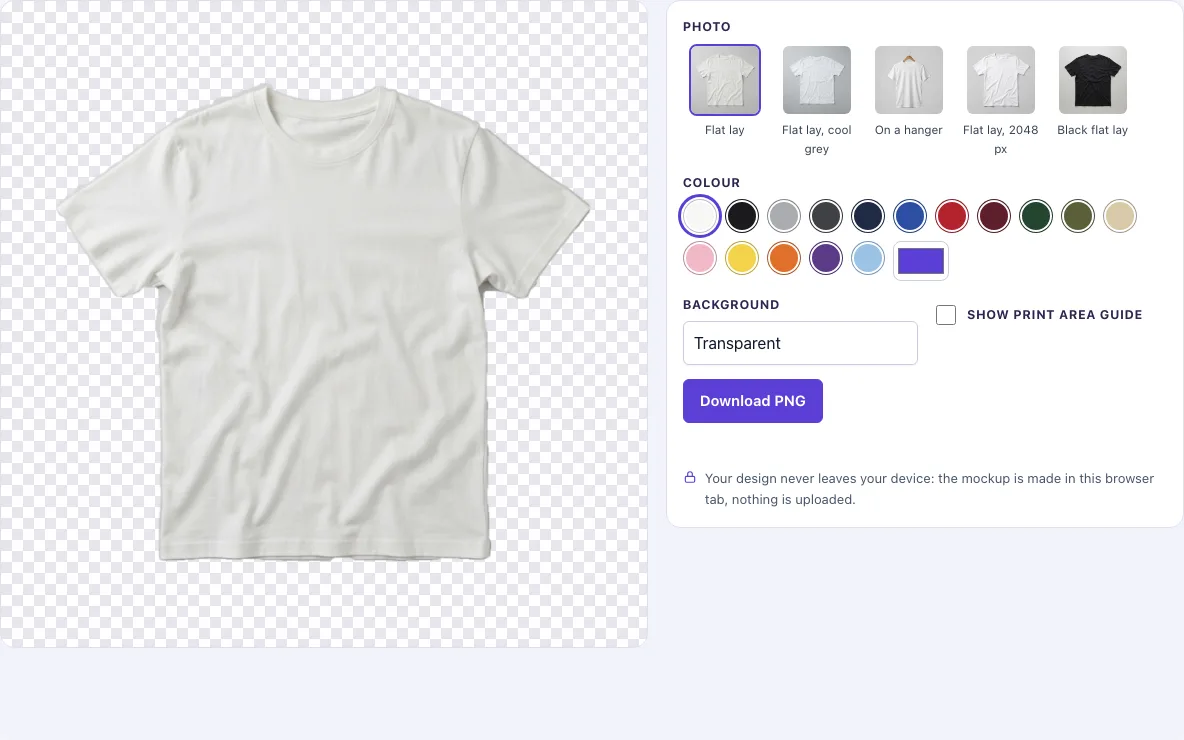
How to use the T-shirt template tool
Work through these steps from top to bottom. Each control updates the preview before you download.
- Open the Photo picker and choose a view: Flat lay, Flat lay, cool grey, On a hanger, Flat lay, 2048 px, or Black flat lay.
- Pick a colour from the Colour swatches. White keeps the photo’s own colour. For any other shade, use the custom colour picker.
- Set Background to Transparent, White, Light grey, or Original photo.
- Switch on Show print area guide to see a dashed pink box and a centre line on the chest, so you can line up your design.
- Click Download PNG to save the template.
Check the preview before you save: recolouring keeps the creases and shadows of the photo. The guide appears in the download only while its switch is on, so turn it off for a clean file, or leave it on if you want a reference for print position. Choose Transparent when you plan to layer the shirt inside another design program.
Whether you call it a t-shirt template, a tshirt template or an empty t shirt template, the file is the same: a blank shirt photo with nothing printed on it. Download one PNG per colour you sell, then place your artwork on each in your design program.
What is a t-shirt template
A t-shirt template is a blank image of a t-shirt that you use as the base for a design. You place your artwork, logo or text on top of the shirt, so the result looks like a finished product without needing a physical sample. Templates work well because the garment’s folds, seams and shadows are already in the photo, so your design can sit on the fabric instead of floating above it.
A template photo shows no logo, print or text, so the shirt stays blank until you add something. Changing the colour alters the fabric but leaves the light and shadow of the photo in place, which is why the shirt still reads as cloth after recolouring.
Designers use templates in several ways: testing colour combinations, creating mockups for product listings or ads, and showing a client how a print would look. The method is the same in any editing software. You open the downloaded PNG as a layer and put your artwork on top of it.
Can I get a transparent background
Yes. Set Background to Transparent and the download is a PNG where the area around the shirt is see-through. PNG is a file type that can store transparency, so the shirt keeps its outline when you move it into another project.
The transparency comes from a mask made for each photo. The mask marks which pixels belong to the shirt, and the cut-out follows that mask. The edge is softened by about one pixel, so the outline blends into whatever sits behind it instead of showing a hard, jagged line.
Pick White or Light grey when you want a solid backdrop, or Original photo to keep the background from the picture. Transparent is the better choice when your design program already has a background, because the shirt sits on top of it without a box around it. In most editors, transparent areas show as a checkerboard pattern until you add a fill layer underneath.
Frequently asked questions
Is the template free?
Yes. The templates are free.
Can I use the template to sell products?
Yes. You may use the templates to design, present and sell your own products, including in listings, ads, portfolios and client presentations, without giving credit. You may not resell the templates or share them as a template pack.
Are there people, logos or text in the photos?
No. The photos are AI-generated blank garments, checked by hand, with no people, no logos and no text.
What size is the download?
Downloads are saved at the photo’s full size: 1024 × 1024 px for most views, and 2048 × 2048 px for Flat lay, 2048 px.
Are there 4K files or more angles?
No. The templates offer the views and sizes listed on this page, and they are free to download.
Do my settings stay when I reload the page?
They do. Your choices for photo, colour, background and guide are kept in the page address, so you can bookmark or copy the link to return to the same setup.
Do I need to install anything or create an account?
No. The tool runs in your browser tab, so there is nothing to install and no account to create. Open the page, add your design and download the result.
Related tools
- Black shirt template: use it when you want a black base for your design.
- T-shirt outline: use it when you need the shirt’s shape alone.
- Hoodie template: use it when your design is for a hooded sweatshirt instead of a tee.
- T-shirt mockup: use it to see a shirt presented as a finished product.
- White shirt mockup: use it when you need a white shirt in a presentation style.
- Apparel mockups: use it to compare several garment types in one place.